
Conversion tracking is the foundation Google Ads Smart Bidding runs on. Without accurate conversion data, Target CPA, Target ROAS, and Maximize Conversions have nothing reliable to learn from, and bids get set on guesswork instead of evidence. Setting up conversion tracking correctly means defining the actions that matter, installing the Google tag in the right places, and feeding Smart Bidding data it can trust.
This guide covers the current Google Ads conversion tracking setup, the conversion volume each Smart Bidding strategy needs to perform reliably, enhanced conversions, and the mistakes that quietly break tracking before you rely on it for real budget decisions. Tracking setup has also shifted alongside what is changing in Google Ads this year, particularly around consent and first-party data requirements.
What Is Conversion Tracking in Google Ads?
Conversion tracking is a free feature built into every Google Ads account that records specific actions people take after clicking your ad, such as a purchase, a form submission, or a phone call. It reports that data back to Google Ads so Smart Bidding can optimize toward real outcomes.
Each tracked action is called a conversion action. You define what counts before any data starts flowing: a purchase confirmation, a demo request, a newsletter signup, a click to call. Google Ads groups these into categories such as sales, leads, sign-ups, and page views, and the category you choose affects how the action is reported and optimized.
Tracking runs on two pieces of code. The Google tag sits on every page and identifies visits that came from an ad click. The event snippet sits only on the page a user reaches after converting, typically an order confirmation or thank-you page. Together, they tell Google Ads which clicks led to which outcomes.
Why Does Conversion Tracking Matter for Smart Bidding?
Smart Bidding strategies use machine learning to set bids at auction time based on your historical conversion data. When that data is inaccurate, incomplete, or delayed, the algorithm still works exactly as designed, it just optimizes toward the wrong outcome.
The real control surface for Smart Bidding is conversion data quality, not bid modifiers or manual adjustments: accurate tracking, correct conversion values, and clean data exclusions when something breaks. Google frames Smart Bidding as a system that factors in more signals than a human team could compute manually, but that only holds if the conversion signal feeding it is trustworthy.
Broken or mislabeled tracking has a direct cost. If a lead form counts as a conversion but a large share of submissions are job applicants rather than buyers, Smart Bidding will find more of the same. The reported cost per acquisition looks great while the sales team quietly reports that lead quality has dropped.
What Do You Need Before You Start?
You need admin access to your Google Ads account, the ability to edit your website code or a developer who can, and ideally a Google Tag Manager container already installed. A linked Google Analytics 4 property is optional but useful.
If you already track events in GA4, you can import those as conversions instead of building separate tags from scratch, which is often the faster path for teams with existing analytics in place. If you would rather hand tracking setup to a team that builds it into every campaign from day one, our performance marketing services include conversion tracking setup as standard.
How Do You Set Up Conversion Tracking in Google Ads?
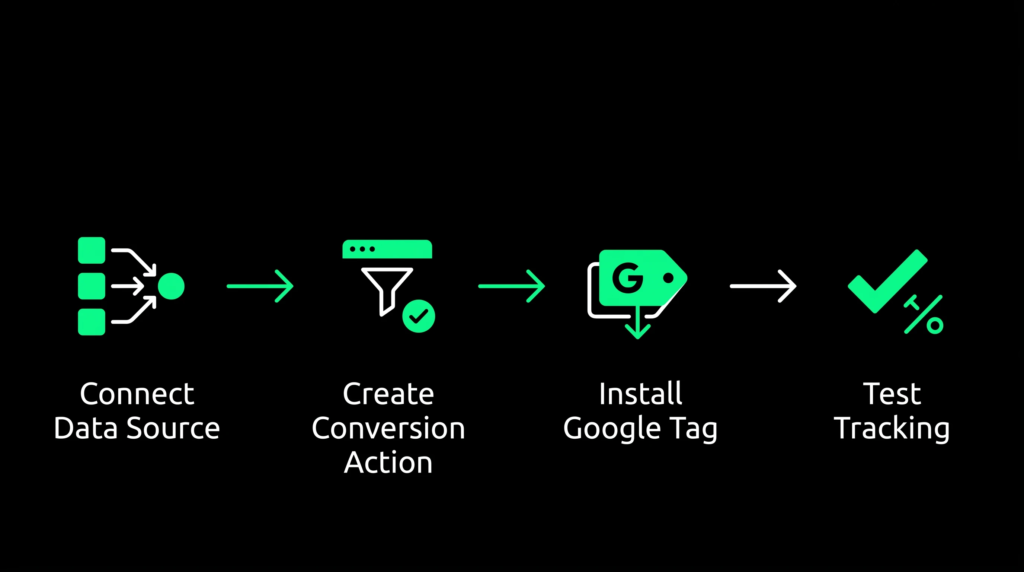
Setting up conversion tracking has three stages: connect a website data source, create a conversion action for each action you want to measure, and install the Google tag so your site reports those actions back to Google Ads.
Step 1: Add Your Website Data Source
Open Goals in the left-hand menu and select Conversions. From the Summary page, select Create conversion action, then Edit data sources for conversions on a website. Enter your domain and select Scan. Google Ads checks your site for an existing Google tag or a linked Analytics property.
If a tag or linked property already exists, your site is ready for conversion actions. If Analytics is found but not linked, you can import its metrics and remarketing audiences at this step. If nothing is detected, Google Ads offers to set up a tag for you before you continue.
Step 2: Create a Conversion Action
Choose a conversion category that matches the action you are measuring, such as purchase, lead, or sign-up. Grouping related actions like website purchase and app purchase into one conversion goal gives Smart Bidding a stronger signal than tracking them separately.
Decide whether the action should count every conversion or just one per user. Purchases usually count every time; lead forms usually count once, since a prospect who submits twice is still one lead. Set a conversion window between 1 and 90 days based on your typical sales cycle, and choose an attribution model. Most accounts default to data-driven attribution rather than last-click.
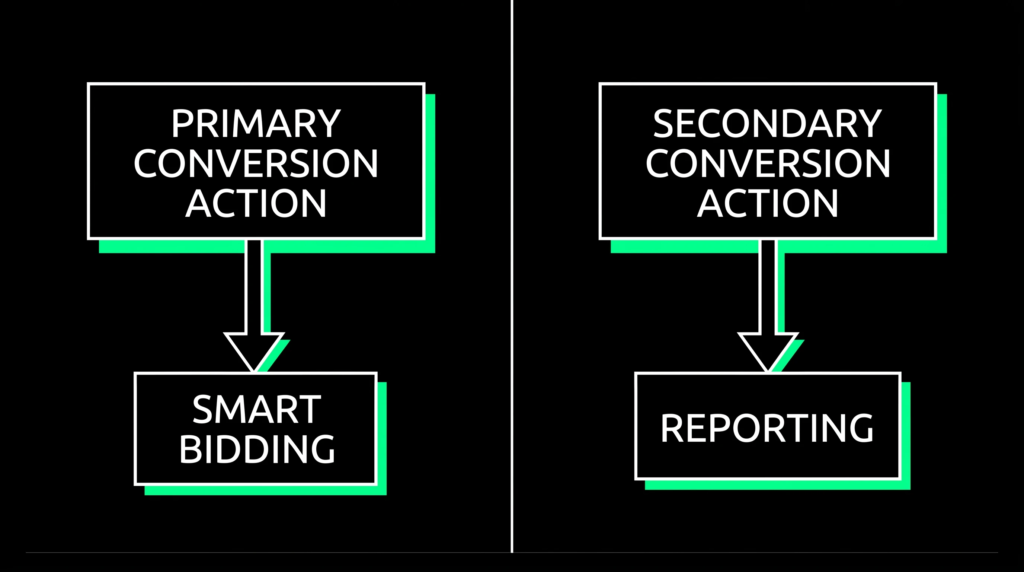
The most consequential setting here is whether the action is primary or secondary. Primary conversions are the ones Smart Bidding optimizes for and the ones that appear in your main conversions column. Secondary conversions are recorded for reporting but ignored by bidding. Misclassifying this is one of the fastest ways to send Smart Bidding chasing the wrong goal.
Step 3: Install the Google Tag
If your site does not already have a tag, Google Ads generates a base Google tag that belongs on every page, plus an event snippet specific to the action you just created. The event snippet goes on the confirmation page the user lands on right after converting, not on the form page itself.
You can add both pieces of code directly to your site HTML, or manage them through Google Tag Manager, which most teams running several conversion actions prefer since it avoids repeated code edits.
Step 4: Test Your Conversion Tracking
Install the Google Tag Assistant browser extension and visit your own conversion page to confirm the tags fire correctly. If you use Google Tag Manager, its Preview mode shows exactly which tags trigger on each interaction before you publish anything live.
Complete a real test conversion, then check the Conversions page in Google Ads. Expect a delay of a few hours before it appears, and confirm the status reads Recording rather than Unverified or No recent conversions.
How Do You Choose the Right Conversion Actions for Smart Bidding?
Only mark an action as primary if it reflects genuine buyer intent, since Smart Bidding optimizes aggressively toward whatever you tell it counts. A newsletter signup and a purchase are both valid conversions, but they should rarely carry the same weight in bidding.
Assign a conversion value wherever possible, even a flat estimated value for leads, since value-based bidding strategies like Target ROAS cannot function without it. For lead generation businesses, importing offline conversions or CRM data lets Smart Bidding learn from actual deal outcomes rather than form fills alone.
Review your primary conversion actions periodically. A form that once represented qualified leads can quietly fill up with low-intent traffic as a campaign scales, and Smart Bidding has no way to know the difference unless you tell it. This distinction matters even more for upper-funnel formats like brand campaigns, where the conversion signal is often weaker and easier to misread.
How Many Conversions Does Smart Bidding Need to Work?
Each Smart Bidding strategy needs a different volume of monthly conversions before it can optimize reliably. Maximize Conversions can function with roughly 15 to 20 a month, Target CPA generally needs around 30, and Target ROAS typically needs 50 or more at the campaign level.
| Smart Bidding Strategy | Recommended Monthly Conversions | What It Optimizes For |
|---|---|---|
| Maximize Conversions | 15 to 20 | Conversion volume |
| Target CPA | 30 or more | Cost per conversion |
| Target ROAS | 50 or more | Conversion value |
These are practical guardrails rather than hard platform limits, and data quality matters as much as raw volume. Twelve genuinely qualified leads teach the algorithm more than sixty spam form fills, since low-quality conversions reinforce the wrong pattern.
If a campaign is not generating enough volume, consolidating similar campaigns that share the same goal can help. Restructuring right after a tracking change resets the learning phase, so avoid it immediately after updating conversion settings. Target ROAS specifically benefits from a four-week ramp-up period with consistent conversion value data before it stabilizes.
What Are Enhanced Conversions and Why Do They Matter?
Enhanced conversions supplement your existing tags with hashed first-party data, such as email addresses or phone numbers collected on your site. Google matches that hashed data against signed-in accounts, recovering conversions that cookie restrictions or ad blockers would otherwise hide.
With third-party cookies increasingly restricted and privacy regulations tightening, enhanced conversions have become close to essential. Advertisers who enable them typically see a measurable lift in reported conversions, since matched data recovers activity that standard cookie-based tracking misses on mobile and cross-device journeys.
To turn them on, open the conversion action you want to enhance under Goals and Conversions, toggle Enhanced conversions, and choose whether to implement through the Google tag, Google Tag Manager, or the Google Ads API. Enhanced conversions work alongside your existing tags rather than replacing them, so there is little downside to enabling them once your site collects the relevant data at conversion.
Common Conversion Tracking Mistakes That Break Smart Bidding
A handful of setup mistakes account for most of the tracking problems agencies see in Google Ads accounts.
- Tagging the wrong page. The event snippet belongs on the thank-you or confirmation page, not the form page a user sees before submitting.
- Counting page views as conversions. Tracking every page load inflates your numbers and gives Smart Bidding a distorted signal.
- Letting duplicate conversions fire. If a tag fires more than once per action, set the counting method to one for leads or add deduplication logic using a transaction ID.
- Leaving conversion values blank. Without values, you cannot calculate return on ad spend or run value-based bidding with any accuracy.
- Skipping Consent Mode. Sites serving the EU or UK without Consent Mode configured lose a meaningful share of conversion data once cookies are declined.
- Restructuring right after a tracking change. Google Ads relearns conversion patterns whenever tracking settings change, so give the algorithm time before making structural edits on top of it.
Frequently Asked Questions
How long does it take for conversions to show up in Google Ads after setup?
Conversions typically appear within a few hours of a real test conversion, though Google Ads recommends allowing up to 24 to 48 hours before assuming something is broken.
Is Google Ads conversion tracking free?
Yes. Conversion tracking is included with every Google Ads account at no extra cost beyond your regular ad spend.
What is the difference between primary and secondary conversion actions?
Primary conversions count in your main conversions column and are the actions Smart Bidding optimizes toward. Secondary conversions are recorded for reporting only and do not influence bidding.
Should I set up conversion tracking natively in Google Ads or import it from GA4?
Import from GA4 if you already have clean key events configured there and want a single source of truth. Set up natively in Google Ads if you need more direct control over settings like counting method and attribution.
Do I need Google Tag Manager to set up conversion tracking?
No. You can add the Google tag and event snippet directly to your site code. Google Tag Manager is optional but makes managing multiple conversion actions easier without repeated code changes.