

If you have ever searched for something on Google and seen a set of questions with expandable answers right below a search result, that is FAQ schema at work. It is one of the most practical structured data types you can add to a page, and it is also one of the most misunderstood.
This guide walks you through everything from understanding what FAQ schema actually is, to writing quality FAQ content, generating the markup, adding it to your site, and making sure it works. We have also covered what changed after Google’s 2023 update, and why FAQ schema now matters even more for AI-driven search results.
Whether you are an SEO manager at a growing company or a founder trying to get more out of your website, this guide gives you a clear, step-by-step path.
| Quick stat: Pages with FAQPage schema are 3.2x more likely to appear in Google AI Overviews compared to pages without it, even when controlling for content quality and ranking position (Search Engine Land, 2024). |
What Is FAQ Schema and Why Does It Matter?
FAQ schema, technically called FAQ Page structured data, is a piece of code you add to a web page that tells search engines: this page contains a list of questions, and here are their answers.
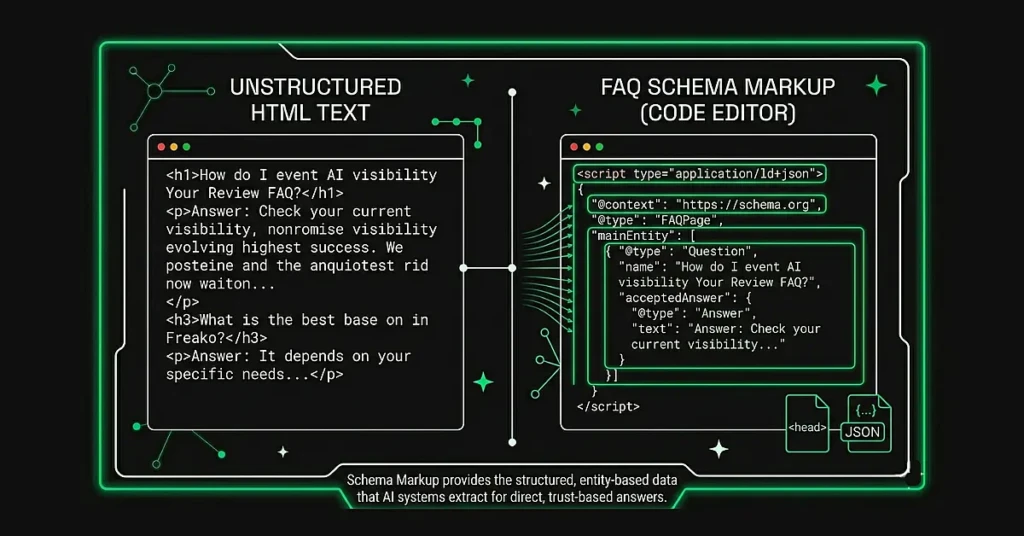
Search engines and AI platforms do not read your page the way a human does. They scan for signals. When you add FAQ schema using JSON-LD format, you are essentially handing them a clearly labelled map of your Q&A content. That removes any guesswork, which makes it far easier for them to extract, index, and cite your answers.
The practical results of this include appearing in featured snippets, getting surfaced in Google AI Overviews, showing up in Perplexity and ChatGPT responses, and in some cases, capturing extra space in standard search results through expandable FAQ dropdowns.
FAQPage vs QAPage vs HowTo Schema: Which One to Use?
These three schema types are often confused with each other. Here is a quick breakdown:
| Schema Type | When to Use It | Who Writes the Answer |
| FAQPage | Your page has a list of questions, each with one definitive answer written by you | You (the page author) |
| QAPage | Your page allows multiple users to submit different answers (like a forum or community Q&A) | Community / users |
| HowTo | Your page walks through a sequential, step-by-step process to complete a task | You (the page author) |
For most business websites, blog posts, product pages, and service pages, FAQ-Page is the right choice. Use QA-Page only if you actually run a platform where users post competing answers.
What Happened to FAQ Schema in 2023 (And Why It Still Works)
In August 2023, Google made a significant change. It restricted FAQ rich results (the expandable dropdown format visible in search results) to only government and health websites. For most businesses, those dropdown FAQs disappeared from search results overnight.
A lot of marketers took this as a sign that FAQ schema was no longer worth the effort. That was the wrong conclusion.
The FAQ Schema Paradox: Less SERP Visibility, More AI Citations
Here is the interesting part. At the same time Google pulled FAQ rich results from most sites, AI platforms like ChatGPT, Perplexity, and Google’s own AI Overviews were becoming the primary way millions of people consume search results.
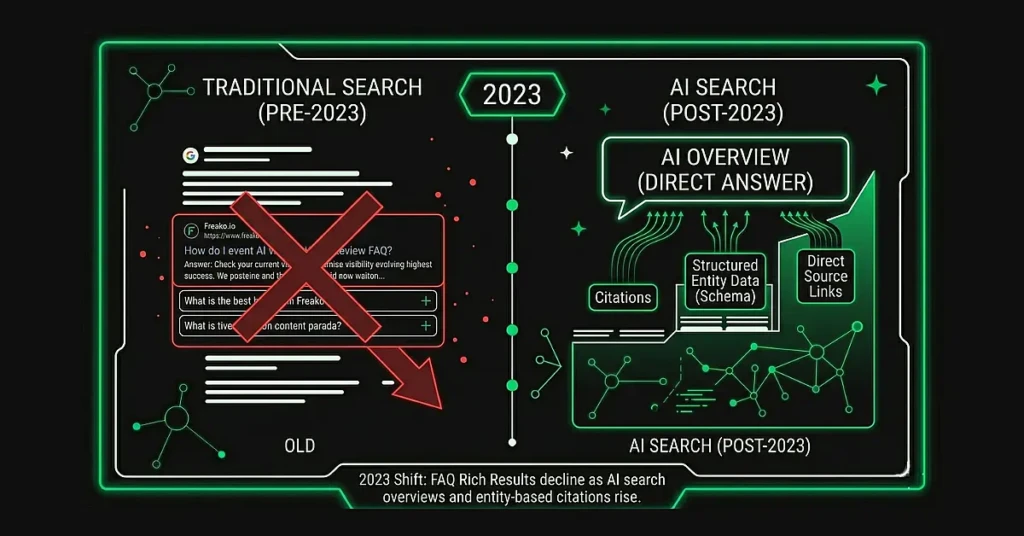
And these platforms actively look for structured FAQ data.
AI search engines do not just scrape raw text. They look for structured data signals to identify which content is reliable, extractable, and citable. If you want to understand the full picture of how AI platforms decide what to cite, and what signals they trust most, that is worth reading separately before diving into the markup itself. FAQ schema gives them exactly that. The question-answer format mirrors how AI models present information to users, making it far easier to extract and cite compared to unstructured paragraphs.
The result is what researchers call a paradox: FAQ schema became less visible in traditional search results but more valuable for AI search visibility. Only about 12.4% of websites currently use any structured data at all, according to Schema.org data. That is a significant competitive opening for early movers.
| Key shift to understand: The metric for FAQ schema success has changed. In 2022, you measured it by FAQ rich result impressions in Google Search Console. In 2025, you measure it by citation frequency in ChatGPT, Perplexity, and AI Overview answers. |
Where to Use FAQ Schema on Your Website
Not every page on your site needs an FAQ schema. Placing it incorrectly can actually work against you, both with Google and with AI platforms that learn to distrust schema from domains that misuse it.
Pages That Should Have FAQ Schema
- Pillar content and in-depth guides: Your most comprehensive topic pages are the highest-priority placement. These pages rank well, carry authority, and are primary citation targets for AI platforms.
- Product and service pages: Add FAQ schema to answer genuine customer questions about pricing, features, compatibility, or support. The key word is genuine. Questions must be informational, not sales copy.
- Dedicated FAQ pages and help centers: If you have a page that exists specifically to answer questions, it is a natural fit for this markup.
- Blog posts covering technical or how-to topics: If a post naturally ends with a FAQ section answering related reader questions, schema it up.
Pages Where FAQ Schema Does Not Belong
- Marketing landing pages where ‘FAQs’ are thinly veiled sales pitches
- Pages with only one or two questions (not enough to warrant the markup)
- Pages where FAQ content is hidden from users via CSS (this violates Google’s guidelines and can result in manual actions)
- Product pages where every ‘question’ is just promotional language dressed up as a question
Schema markup is only one part of a working SEO setup. If your rankings have been flat despite adding structured data, the issue is usually elsewhere, and what incomplete SEO looks like in practice is worth understanding before investing further.
| Google’s rule: The questions and answers in your schema must match what is actually visible on the page. You cannot mark up content that users cannot see. Accordion-style FAQ sections (where questions are visible and answers expand on click) are perfectly fine. |
How to Write High-Quality FAQ Content (Before You Add Schema)
Schema markup is only as good as the content underneath it. Adding structured data to a weak FAQ section will not produce strong results. The quality of the questions and answers is what determines whether AI platforms trust and cite your content.
How to Pick the Right Questions
The most common mistake is guessing which questions to include. Here are four reliable ways to find questions your actual audience is searching for:
- Google’s ‘People Also Ask’ boxes: Search for your main topic and note which related questions appear. These represent proven search demand.
- Search volume data: Use tools like Ahrefs, Semrush, or Google Keyword Planner. A question with 1,000 monthly searches is worth a FAQ answer. One with 10 searches probably is not.
- Customer support logs and sales call notes: The questions your team gets asked repeatedly are often the most valuable ones to answer publicly.
- Competitor FAQ analysis: Look at what your top-ranking competitors cover. This validates importance and can reveal gaps you can fill better.
Questions should cover different angles of the topic: definitional (what is it?), procedural (how do I do it?), strategic (why does it matter?), and comparative (how is it different from X?). A balanced FAQ section serves a wider range of user intents, which increases your citation surface area.
How Long Should a FAQ Answer Be?
The research across multiple sources consistently points to a 40 to 60 word sweet spot for FAQ answers intended for AI extraction and featured snippets.
| Answer Length | The Problem | Recommendation |
| Under 30 words | Too short to provide enough context. Cannot stand alone as a self-contained answer. | Avoid |
| 40 to 60 words | Long enough for context, short enough for clean AI extraction. Fits featured snippet format. | Target this range |
| Over 80 words | Harder for AI platforms to extract as a single unit. Users scanning for quick answers may skip it. | Use only if necessary |
The most important rule: each answer must be self-contained. AI platforms extract individual Q&As without surrounding context. If your answer says ‘as mentioned above’ or relies on something from three paragraphs earlier, it will not work well in AI citations.
What Makes an Answer Citation-Worthy for AI?
Specific, factual answers get cited more often than vague ones. This is not just good writing advice; it reflects how AI models are trained to evaluate source reliability.
| Weak vs Strong: See the Difference Weak: ‘FAQ schema is very important for AI search visibility.’ Strong: ‘Pages with FAQPage markup are 3.2x more likely to appear in Google AI Overviews compared to pages without structured Q&A data, according to Search Engine Land.’ |
The strong version includes a specific multiplier, a named source, and a concrete claim. Those are the elements AI platforms look for when deciding which content to cite. Include statistics with sources, named experts or publications where relevant, and specific outcomes rather than general benefits.
This connects directly to E-E-A-T, Google’s content quality framework. The same signals that make an answer credible to a human reader are the ones Google and AI platforms use to evaluate trustworthiness. If E-E-A-T signals that extend beyond your own site are not something you have looked at yet, that is the right place to start.
Also write in a neutral, informational tone. ChatGPT, in particular, shows a strong preference for content written in the style of Wikipedia or authoritative reference pages. Avoid promotional language in your FAQ answers entirely.
How to Create FAQ Schema Markup (JSON-LD, Step by Step)
Now for the practical part. Here is how to go from a FAQ section on your page to fully implemented schema markup.
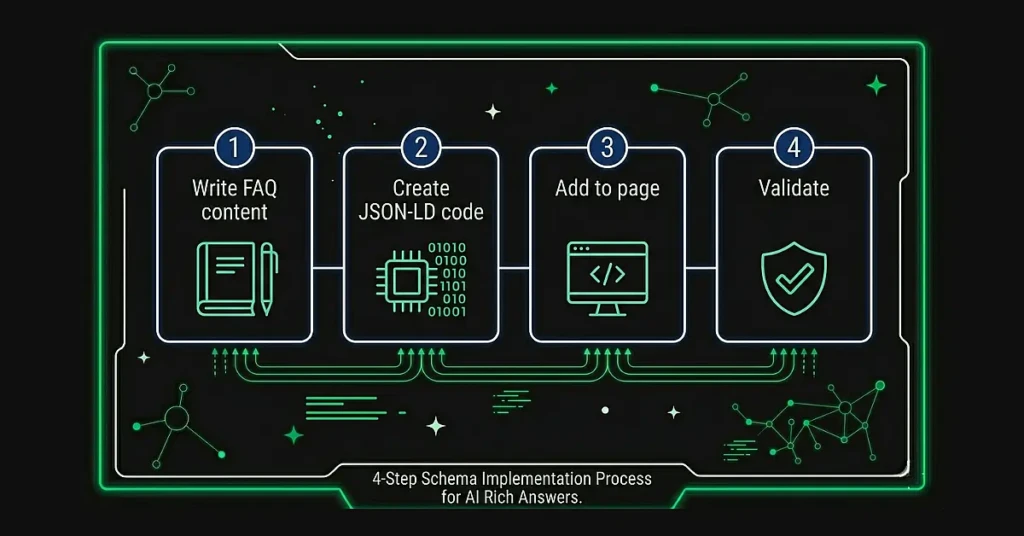
Step 1: Choose Your Format (JSON-LD Recommended)
There are two main formats for adding schema to a page: JSON-LD and Microdata. Google recommends JSON-LD for most implementations. It is added as a script block to your page’s HTML rather than being embedded within your visible content, which makes it cleaner to maintain.
Unless you have a specific technical reason to use Microdata, go with JSON-LD.
If you need support with the broader technical implementation across your site, our SEO services cover structured data setup as part of a full technical audit.
Step 2: Write the JSON-LD Code
Below is a complete, validated FAQPage schema example you can use as a template. Replace the questions and answers with your own content.
| <script type=”application/ld+json”> { “@context”: “https://schema.org”, “@type”: “FAQPage”, “mainEntity”: [ { “@type”: “Question”, “name”: “What is FAQ schema?”, “acceptedAnswer”: { “@type”: “Answer”, “text”: “FAQ schema (FAQPage) is structured data markupusing JSON-LD format. It explicitly labels questions and their answers on a web page, helping search engines and AI platforms understand the Q&A relationship and extract information for featured snippets and AI-generated citations.” } }, { “@type”: “Question”, “name”: “How many FAQ questions should I include on a page?”, “acceptedAnswer”: { “@type”: “Answer”, “text”: “Include 5 to 10 FAQ questions per page for pillar content. Fewer than 5 provides limited value for AI extraction opportunities. More than 10 can dilute topical focus. Quality matters more than quantity: each answer should be 40-60 words, self-contained, and include specific data where possible.” } } ] } </script> |
Key components to understand:
- @context and @type: These identify the schema vocabulary (Schema.org) and specify this is a FAQPage. Required for all schema implementations.
- mainEntity: An array containing all your Question objects. Add as many question blocks as you need.
- name (inside Question): The full text of the question. This should match the heading text on your visible page exactly.
- acceptedAnswer / text: The full answer content. Keep it between 40 and 60 words, self-contained, factual.
Common coding mistakes to avoid:
- Unescaped quotes inside text fields: If your answer contains a quote, use a backslash before it (\”like this\”) or rephrase to avoid the quotes.
- Missing commas between objects: Each Question object in the mainEntity array must be separated by a comma.
- Wrong property names: The correct property is ‘mainEntity’ not ‘questions’. Typos break recognition entirely.
- Answer text that references the rest of the page: Keep each answer independent.
Step 3: Add the Schema to Your Page
Paste the complete script block into the HTML of your page. The recommended placement is either in the <head> section or just before the closing </body> tag. Both work. If you are using a CMS, see the platform-specific tips in the next section.
One important rule: the questions and answers in your schema must match what users actually see on the page. Do not mark up content that is hidden. Accordion-style dropdowns are fine because the question text is visible even when the answer is collapsed.
Step 4: Validate Your Schema
Always validate before publishing. Google’s Rich Results Test is the primary tool for this.
- Go to search.google.com/test/rich-results
- Paste your page URL or your raw HTML code
- Check for any errors (red) or warnings (orange)
- Fix any issues before publishing the page
Also run the Schema Markup Validator at validator.schema.org for a secondary check. This tool validates your schema.org syntax specifically, independent of Google’s rich result eligibility rules.
After publishing, it typically takes 2 to 4 weeks for AI platforms to crawl, index, and begin citing your FAQ content. Monitor your appearance in ChatGPT, Perplexity, and Google AI Overviews over time to measure impact.
Platform-Specific Tips (WordPress, Shopify, Webflow, HTML)
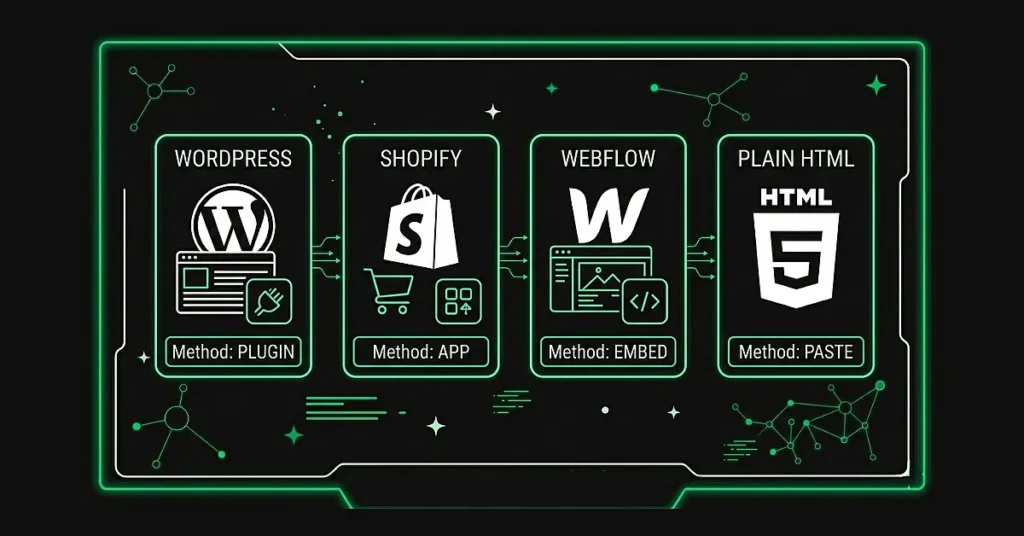
| Platform | Recommended Method | Key Notes |
| WordPress | Yoast SEO or Rank Math plugin | Both plugins include a FAQ block in the Gutenberg editor. When you use their FAQ block, they auto-generate the schema. No coding required. Check the plugin settings to ensure schema output is enabled. |
| Shopify | JSON-LD for SEO app or manual theme edit | Add the script block to the relevant liquid template file (product.liquid or page.liquid). Some paid Shopify SEO apps handle this automatically. |
| Webflow | Custom code embed block | Use Webflow’s ‘Embed’ element (HTML widget) to insert the script block directly into the page. Place it in the page body. Test with Rich Results Test after publishing. |
| Plain HTML | Paste directly into page source | Add the script block to the HTML of the specific page. Add to <head> or before </body>. No plugin needed. Validate with Rich Results Test. |
Regardless of platform, the same validation steps apply. Always test your implementation in Google’s Rich Results Test after making changes.
How FAQ Schema Impacts ChatGPT, Perplexity, and Google AI Overviews
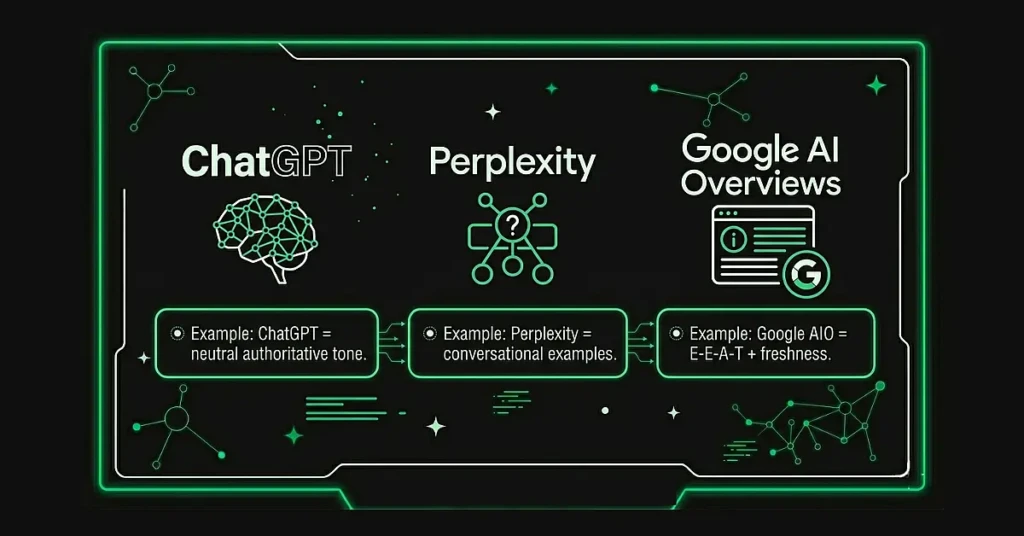
Different AI search platforms have different content preferences. Understanding these differences helps you write FAQ content that performs across all of them simultaneously.
ChatGPT
ChatGPT shows a strong preference for neutral, authoritative, encyclopedic content. Wikipedia accounts for nearly 48% of total ChatGPT citations, according to GEO research, and comparative articles account for around 33%. Both formats share a common trait: clear structure, neutral tone, and verifiable facts.
To optimize FAQ content for ChatGPT citations, write in an objective informational tone (not promotional), include specific statistics with named sources, use H3 headings for each question, and keep answers at 40 to 60 words.
Perplexity
Perplexity shows a noticeably higher rate of citing Reddit compared to other AI platforms. This signals its preference for authentic, experience-based, conversational content.
For Perplexity, write questions the way real people actually ask them (not formal business language), include real-world examples or practical scenarios in your answers, and write with a slightly more personal voice while maintaining accuracy. Think of it as an expert friend explaining something, not a corporate documentation page.
Example of a Perplexity-optimized phrasing: ‘How do I actually add FAQ schema to my website?’ performs better than ‘What are the implementation specifications for FAQPage schema?’
Google AI Overviews
Google AI Overviews uses a domain-agnostic approach to citations. It pulls heavily from featured snippet content, pages with strong E-E-A-T (Experience, Expertise, Authoritativeness, Trustworthiness) signals, and pages with proper structured data.
For Google AI Overviews, focus on keeping answers between 40 and 60 words with a direct answer upfront, adding E-E-A-T signals like author credentials and publication dates, keeping FAQ content updated with fresh statistics and examples (monthly where possible), and combining FAQ schema with Article schema and Organization schema for layered verification. For a broader view of how SEO and GEO work together in 2026, and why optimising for AI answers does not replace traditional search strategy, that distinction is worth understanding before setting priorities.
| Platform Strategy: You do not need three separate FAQ sections for three platforms. Write answers that include specific data with authoritative citations (ChatGPT), use accessible language with practical examples (Perplexity), and feature current dates and fresh statistics (Google AIO). One well-written answer can satisfy all three. |
Common FAQ Schema Mistakes and How to Avoid Them
| Mistake | Why It Hurts | How to Fix It |
| Hiding FAQ content from users | Violates Google guidelines. AI platforms treat hidden schema as manipulative and may ignore it or penalize the domain. | Ensure all schema’d Q&As are visible on the page. Accordions (expand on click) are acceptable. CSS display:none is not. |
| Writing promotional FAQ answers | AI platforms distinguish between informational content and marketing copy. Promotional answers are not cited. | Ask: ‘Would this answer satisfy someone researching this topic objectively?’ If not, rewrite it as genuinely helpful information. |
| Answers that are too vague | Vague answers (‘it really helps with SEO’) give AI platforms nothing specific to cite. | Include specific numbers, percentages, dates, or named sources. Specificity is the single biggest citation driver. |
| Not validating the schema | Syntax errors (missing commas, unescaped quotes, wrong property names) break JSON parsing entirely. The page looks fine to humans but is invisible to AI platforms. | Run Google Rich Results Test for every implementation. Run again after any site updates. |
| Questions that do not match page headings | Schema and visible content must match. Mismatches confuse AI systems and can be flagged as manipulation. | Copy the exact heading text from your page into the ‘name’ property. They should be identical. |
| Letting FAQ content go stale | Outdated statistics and examples lose citation share to competitors who update more frequently. | Audit FAQ sections quarterly. Update statistics, examples, and dates to keep content current. |
FAQ Schema Quick Reference Checklist
Use this before publishing any page with FAQ schema:
| Pre-Publish FAQ Schema Checklist – Questions are visible on the page (not hidden by CSS) – Question text in schema matches H2/H3 heading text on the page exactly – Each answer is 40 to 60 words (self-contained, no references to other sections) – Answers include specific data, statistics, or named sources where possible – Answers are written in neutral, informational tone (not promotional) – JSON-LD syntax validated with Google Rich Results Test (no errors) – Also checked with Schema Markup Validator at validator.schema.org – Mobile rendering tested (most AI queries happen on mobile) – Page load speed not impacted by the added script block – 5 to 10 questions per page (pillar content), 3 to 5 for supporting pages – FAQPage schema combined with Article or Organization schema where applicable |
If you want help building the content and technical foundation that makes FAQ schema and AI visibility more broadly actually work, see how we approach SEO.
Frequently Asked Questions About FAQ Schema
Does FAQ schema still work after Google’s 2023 update?
Yes, but its value shifted. Google restricted the expandable FAQ rich result format to government and health websites in August 2023. However, FAQ schema remains fully relevant for featured snippets, voice search, and AI search platforms like ChatGPT, Perplexity, and Google AI Overviews, all of which actively extract and cite structured FAQ data.
How is FAQ schema different for SEO versus GEO or AEO?
In traditional SEO, FAQ schema aimed at rich results and featured snippets in Google search. In GEO (Generative Engine Optimization) and AEO (Answer Engine Optimization), FAQ schema enables AI platforms to extract and cite your content in generated answers across ChatGPT, Perplexity, and Google AI Overviews. The goal shifted from getting clicks through visible rich results to earning citations in AI responses that users read without clicking through to source sites.
How many FAQ questions should I include per page?
Aim for 5 to 10 questions for pillar content pages. Fewer than 5 provides limited value for AI extraction. More than 10 can dilute topical focus. For supporting blog posts, 3 to 5 questions is usually sufficient. Quality and specificity matter more than volume.
Can I use FAQ schema on product pages?
Yes, as long as the FAQs are genuinely informational rather than promotional. Google’s structured data guidelines prohibit FAQ schema for advertising content. Focus on answering real customer questions about features, pricing, shipping, compatibility, or how the product works. Avoid questions whose answers are just sales copy.
How long does it take to see results from FAQ schema?
For traditional search features like featured snippets, results can appear within days to weeks of Google recrawling the page. For AI platform citations (ChatGPT, Perplexity, Google AI Overviews), allow 2 to 4 weeks after implementation. Monitor your visibility in these platforms over time, as AI citation patterns develop differently from traditional search rankings.
Should FAQ schema be different for ChatGPT versus Perplexity?
The schema markup itself (FAQPage standard) stays the same across all platforms. What varies is content tone and style. ChatGPT favors neutral, authoritative answers with specific data and external citations. Perplexity prefers conversational, experience-driven content with practical examples. Google AI Overviews emphasizes E-E-A-T signals, fresh content, and featured snippet formatting. Write answers that balance all three preferences for maximum citation probability.
Need Help Implementing Schema for Your Website?
Our team at Freako helps businesses set up structured data correctly, from FAQ schema to full technical SEO audits. Get in touch to see how we can improve your search and AI visibility.