
Custom audiences and lookalikes in Google Ads give lead gen advertisers two ways to reach new prospects beyond search keywords. Custom segments describe your ideal buyer with search terms, URLs, and apps. Lookalike segments start from your own customer data and find people who resemble it. Both changed in 2026, so setup advice from even a year ago can point you in the wrong direction.
This guide covers where each audience runs, how to seed it with qualified leads, and the exact setup path for each one.
What Are Custom Audiences and Lookalikes in Google Ads?
In Google Ads, “custom audiences” usually means two things: custom segments, built from keywords, URLs, and apps, and Customer Match lists, built from your own customer data. Lookalike segments use first-party lists like these as a seed to find similar new people.
Custom intent and custom affinity audiences were merged into a single product called custom segments. Google uses your inputs to model an audience, so entering a competitor’s URL does not mean your ads will appear on that site.
Customer Match is different. You upload customer data you collected online or offline, and Google matches it to signed-in users so you can reach those people across Search, the Shopping tab, Gmail, YouTube, and Display.
Lookalike segments replaced Similar Audiences. Google stopped creating new similar segments in May 2023 and removed them from all campaigns by August 2023. Lookalikes now work only from seed lists you choose, which makes the quality of your first-party data the main lever you control.
Where Can You Use Each Audience Type?
| Audience Type | Built From | Campaign Types | Best Lead Gen Use |
|---|---|---|---|
| Custom segment | Keywords, Google search terms, URLs, and apps | Display, Gmail, Demand Gen, Performance Max, Video | Prospecting people researching your service category |
| Customer Match | Customer data you upload from a CRM or offline records | Search, Shopping tab, Gmail, YouTube, Display | Retargeting, exclusions, and lookalike seeds |
| Lookalike segment | Up to 10 first-party seed lists | Demand Gen and Video brand campaigns | Scaling prospecting from your best leads |
Google’s help documentation for Video campaigns now lists lookalikes as available for Demand Gen and Video brand campaigns, a change reported on September 1, 2026. Add a lookalike segment anywhere else and it shows as “Eligible – Limited,” which means it will not serve there. With standalone Display campaigns moving into Demand Gen, that is where most lead gen accounts will run both audience types. This is one of several shifts covered in our breakdown of what’s changing in Google Ads in 2026.
How Do You Build a Seed List That Produces Qualified Leads?
Seed your lookalikes with people who became qualified leads or customers, not everyone who filled out a form. Google recommends high-intent seed lists built from recent converters, and lead gen accounts usually find those people in the CRM rather than the website tag.
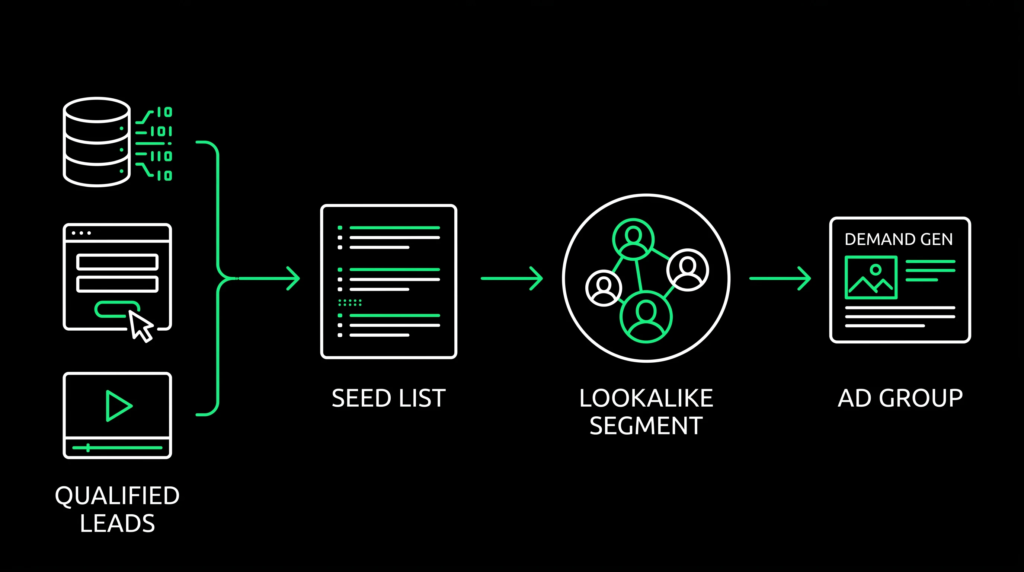
Google also suggests adding people who came close to converting and users who engaged with your brand on external channels. For a lead gen business, that usually means three sources:
- A Customer Match list of sales-qualified leads and closed customers exported from your CRM
- A website visitor list of people who reached your form thank-you page
- A YouTube engagement list as a secondary signal, if you run video
Keep those lists current. Customer Match memberships expire after 540 days, and at least 100 members must be added or updated within that window for a list to stay eligible. If you sync lists programmatically, note that Google now points Customer Match uploads to Data Manager, and uploads through the Google Ads API stopped working on April 1, 2026.
Also note that campaigns using Smart Bidding and optimized targeting automatically include every Customer Match list in the account unless you opt out or remove the lists, so a “clean” audience test may not be as clean as it looks.
How Do You Set Up a Custom Segment, Step by Step?
- Open Audience manager in Google Ads and go to the Custom segments page.
- Click the plus button and give the segment a name that states its theme, such as “Custom – Search Intent – CRM Migration.”
- Choose how Google should read your keywords. For lead gen, start with “People who searched for any of these terms on Google,” which is generally the higher-intent option.
- Add 10 to 15 of your top converting search terms, pulled from your Search terms report.
- Put competitor URLs, industry publications, or apps in a separate segment so you can tell which input actually drives leads.
- Click Create, then attach the segment at the ad group level through Edit audience segments.
The “searched for” option only reflects actual searches on Google properties such as Google.com and YouTube; elsewhere, Google treats them as interests. Custom segments are not shareable between accounts. If you work from a manager account, you will not find a custom segments table there, so each client account needs its own.
How Do You Create a Lookalike Segment in Demand Gen?
Lookalike segments can only be created inside a campaign, at the ad group audience step. You pick up to 10 seed lists, your target locations, and a reach level, then give Google two to three days to populate the segment before launch.
- Create a Demand Gen campaign following the usual steps, ideally two to three days before you want ads to serve.
- At the ad group level, add an audience and select New Audience.
- Click the “Add or create Lookalike segment” box, then select New Segment.
- Name the segment.
- Add at least one seed list and up to 10: website visitors, app users, customer lists, Google Analytics audiences, or YouTube audiences.
- Enter the countries or regions you want the segment to target.
- Choose Narrow, Balanced, or Broad on the reach slider, then click Save.
A new segment takes about 72 hours to populate. You can check its status in Audience manager under Your data segments, where it will show as populating, complete, seed list too small, or inactive. You cannot edit or delete a lookalike segment from Audience manager, so name it carefully the first time.
Suggestion Mode vs. Targeting Constraint
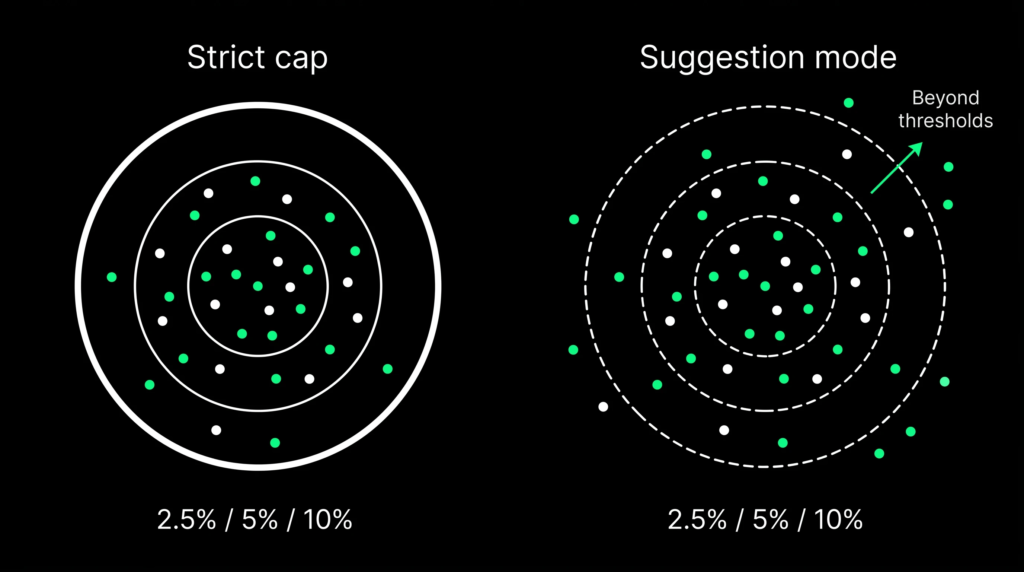
Since March 2026, Demand Gen treats lookalike segments as audience suggestions by default. Your seed list becomes a signal for Google’s models, and the system may reach people outside the similarity thresholds if it predicts they will convert. Advertisers who want the original behavior can opt out through a Google form, with removal expected in about three days.
| Setting | Suggestion Mode (Default) | Targeting Constraint (Opt-Out) |
|---|---|---|
| Reach slider | Guides Google’s AI, no hard cap | Caps reach at 2.5%, 5%, or 10% of users in the target location |
| Seed list minimum | The 100-user minimum no longer applies | Seed lists must total more than 100 active matched people |
| Reporting | “Signal” tag next to the lookalike row | Standard segment reporting |
| How to get it | Default for Demand Gen since March 2026 | Google opt-out form |
Video brand campaigns still use the tiers as hard limits. For lead gen, the choice comes down to your conversion data. Suggestion mode makes more sense when Google receives reliable qualified-lead signals. Strict targeting is easier to read when budgets are small, conversion data is thin, or the business cannot absorb a wave of weak leads.
How Should You Structure Lead Gen Campaigns Around These Audiences?
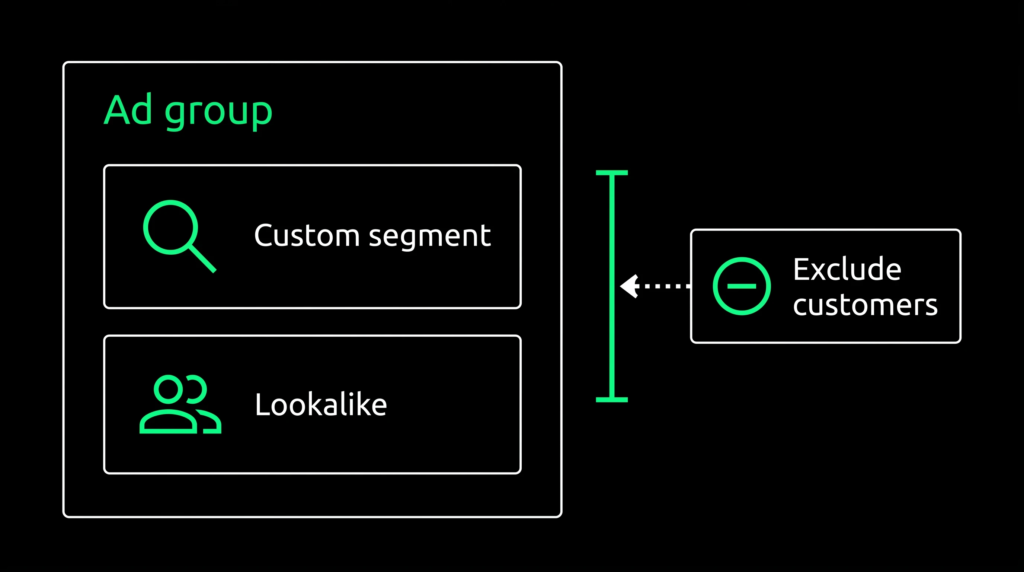
- Pair a lookalike with a custom segment. Google recommends placing a lookalike segment in the same ad group as a high-intent custom segment built from 10 to 15 top converting search terms.
- Exclude people you already have. Add your customer and converted-lead lists as exclusions in prospecting ad groups so acquisition ads do not go to existing customers.
- Feed back lead quality. If every form fill counts as an equal conversion, Google learns to find cheap form fillers. Our guide to conversion tracking in Google Ads explains how to set up the signals Smart Bidding needs.
- Watch Optimized Targeting. To measure a lookalike on its own, remove other audiences from the ad group and turn Optimized Targeting off.
- Check sensitive categories. Since June 2026, Demand Gen campaigns promoting products in 21 sensitive interest categories cannot use advertiser-curated audiences, lookalikes included.
What Setup Mistakes Hurt Lead Quality?
- Seeding lookalikes with every form submission instead of qualified leads and customers.
- Treating custom segment terms like Search keywords. Match types do not apply, and you get no search terms report for the audience.
- Using broad B2B terms that also attract job seekers, students, and researchers.
- Adding a lookalike to Search or Performance Max, where it shows as Eligible – Limited.
If you also run Meta, our guide to Facebook ad audience targeting covers how audiences work on that platform. For agencies that want Google Ads audience builds handled for clients, our performance marketing team sets up and manages these campaigns alongside Search and social ads.
Frequently Asked Questions
Are Similar Audiences still available in Google Ads?
No. Google stopped creating Similar Audiences in May 2023 and removed them from campaigns by August 2023. Lookalike segments in Demand Gen and Video brand campaigns now fill that role.
What is the minimum seed list size for a Google Ads lookalike?
In the default suggestion mode for Demand Gen, Google says the 100-user minimum no longer applies. If you opt out to strict targeting, or use lookalikes in Video brand campaigns, your seed lists must total more than 100 active matched people.
Can I use lookalike segments in Search or Performance Max campaigns?
No. Lookalike segments serve only in Demand Gen and Video brand campaigns and show as Eligible – Limited elsewhere. Custom segments do work in Performance Max, where they act as audience signals rather than strict targeting.
How long does a lookalike segment take to start working?
Google says a new lookalike segment takes about 72 hours to populate and recommends creating it two to three days before launch. It then refreshes every one to two days.
What is the difference between a custom segment and Customer Match?
A custom segment models an audience from keywords, URLs, and apps you supply. Customer Match targets known people from data you upload. For lead gen, Customer Match lists make strong lookalike seeds.