
Most Google Ads accounts now run Performance Max and Search side by side, and both campaign types draw from the same budget. The pmax vs search question is rarely about picking one. It is about deciding which campaign gets the next dollar, and what has to be true before you move it.
Get the split wrong in one direction and Performance Max quietly takes credit for branded sales your Search campaign would have closed at a lower cost. Get it wrong in the other and you cap growth by keeping all your spend on queries people already type. This guide covers how each campaign type works, what the overlap data shows, published starting splits by account stage, and the signals that tell you when to shift budget.
What Is the Difference Between PMax and Search Campaigns?
Search campaigns show ads on queries you choose through keywords and match types, so you control intent, copy, and landing pages. Performance Max is a goal-based campaign that serves across Search, YouTube, Display, Discover, Gmail, and Maps, with Google choosing where ads appear.
Google describes Performance Max as a single campaign that can access all Google Ads inventory, and positions it as a complement to keyword-based Search rather than a replacement. You supply assets, audience signals, and a conversion goal. Google decides where each impression runs.
That trade sits at the center of the budget question. Search gives you control over which queries you pay for. PMax gives you reach that keywords cannot cover, at the cost of visibility into where spend lands.
| Factor | Search | Performance Max |
|---|---|---|
| Targeting | Keywords and match types you select | Conversion goal, assets, and audience signals |
| Where ads run | Google Search and search partners | Search, Shopping, YouTube, Display, Discover, Gmail, Maps |
| Negative keywords | Full control | Up to 10,000 per campaign since January 2025 |
| Search term visibility | Full search terms report | Partial: covers Search and Shopping inventory only |
| Best at | Defending branded and high-intent demand | Finding new demand beyond your keyword list |
Does Performance Max Steal Traffic From Search Campaigns?
It can. Google gives an exact match Search keyword priority over PMax when a query matches it, but overlap still appears in most accounts. When the two campaigns perform differently on the same queries, Search usually converts better.
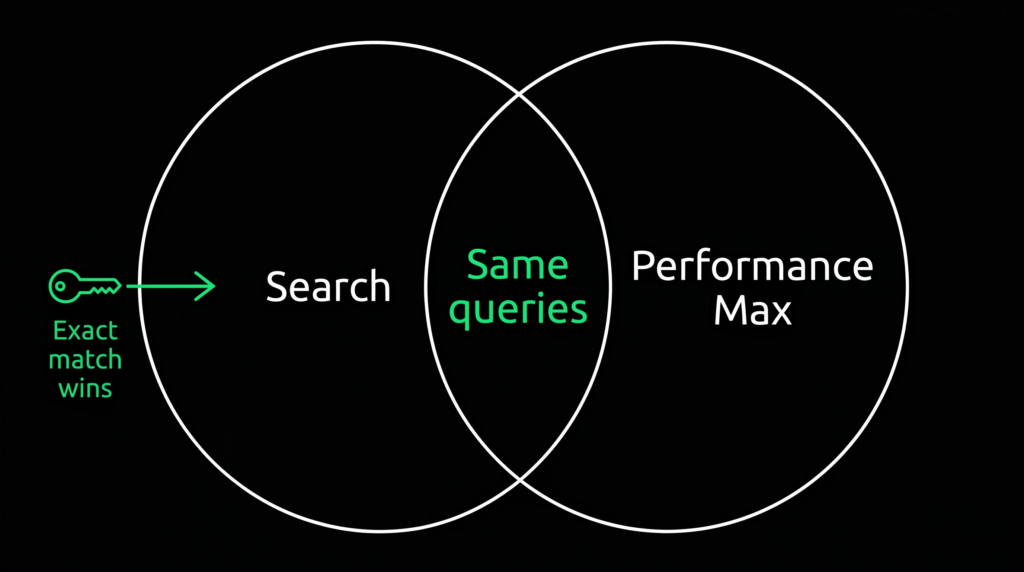
According to Google’s own documentation, Search campaigns containing an exact match keyword are prioritized over Performance Max when a query hits that keyword. The same page notes an exception: if your Search campaign is budget-limited, PMax may occasionally serve on exact match terms. PMax search themes carry the same priority as phrase and broad match keywords, so anything outside exact match comes down to ad rank.
In practice, the overlap is common. An Optmyzr study of 503 accounts found that 91.45% had keyword overlap between Search and PMax, and the overlap touched 56.29% of Search campaigns. When conversion rates on those overlapping keywords differed by more than 10%, Search came out ahead 18.91% of the time against 6.17% for PMax, and the rest showed no meaningful difference.
A separate Adalysis analysis published in Search Engine Land, covering more than 3,300 non-retail PMax campaigns, found Search had the higher conversion rate on overlapping search terms 84.18% of the time.
The risk is not that PMax is a bad campaign type. It is that PMax can win branded and bottom-funnel queries that Search would have converted anyway, then report those sales as its own. Blended ROAS looks healthy while you pay a premium for customers who already knew your name.
How Should You Split Your Budget Between PMax and Search?
Fund Search first for branded and proven high-intent keywords, then give Performance Max the next growth dollar once the account has enough conversion volume to train it. Most practitioners start Search-heavy and shift toward PMax as signal and spend grow.
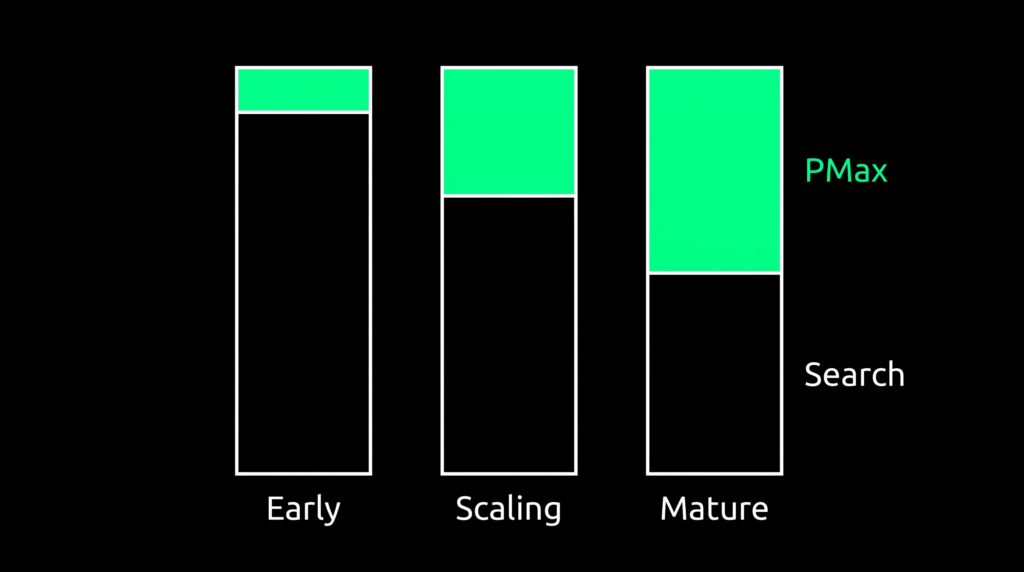
There is no universal percentage. The right mix depends on your business model, monthly spend, and how much conversion data the account produces. What practitioners agree on is the order of operations: protect Search first, then scale PMax with the budget that remains.
The table below collects starting splits published by teams that manage both campaign types. Treat them as ranges to test against, not targets.
| Account situation | Suggested split | Source |
|---|---|---|
| Lead gen, under 50 conversions per month | 80% Search / 20% PMax | NAV43 |
| Lead gen, 50+ conversions per month with CRM data | 70% Search / 30% PMax | NAV43 |
| Mature lead gen with offline conversion tracking | 50 to 60% Search / 40 to 50% PMax | NAV43 |
| Any account under $10,000 per month | Search and Shopping only | Opascope |
| Accounts at $10,000 to $50,000 per month | Test PMax at 15 to 25% | Opascope |
| Ecommerce at $50,000+ per month | 40 to 60% PMax | Opascope |
| Consumer brands at any stage | Flag Search above 25% of total marketing budget | Bigeye |
Notice the gap between lead gen and ecommerce. Opascope reports that PMax rarely earns more than 20 to 30% of the Google budget for B2B lead generation, while ecommerce accounts at scale often run close to an even split. PMax works best with clean purchase signals. A form fill is a weaker signal, so lead gen accounts usually keep Search in the lead longer.
What Needs to Be in Place Before PMax Gets More Budget?
PMax needs steady conversion volume, a daily budget large enough to learn, brand exclusions, and conversion data that reflects real business value. Without those inputs, it tends to chase cheap conversions instead of good customers, and the budget you add mostly buys noise.
- Conversion volume: Bigeye and NAV43 both put the floor at roughly 30 to 50 conversions per month before PMax can optimize with consistency. Opascope uses 20 to 30 per campaign.
- A real daily budget: NAV43 recommends at least $100 to $150 per day for PMax so it gathers enough data across channels.
- Quality signals for lead gen: if your only conversion is a form fill, PMax learns to find more form fills. Importing qualified lead or closed deal stages from your CRM gives it a revenue signal.
- Brand exclusions turned on: this keeps PMax from claiming credit for people already searching your name.
Before you scale anything, make sure you set up conversion tracking in Google Ads so the signal matches real business value.
How Do You Stop PMax From Cannibalizing Your Search Campaigns?
Build three lanes: an exact match brand Search campaign, Search campaigns for high-intent non-brand terms, and PMax with brand exclusions applied. Then audit the search term reports from both campaign types for overlap on a regular schedule.
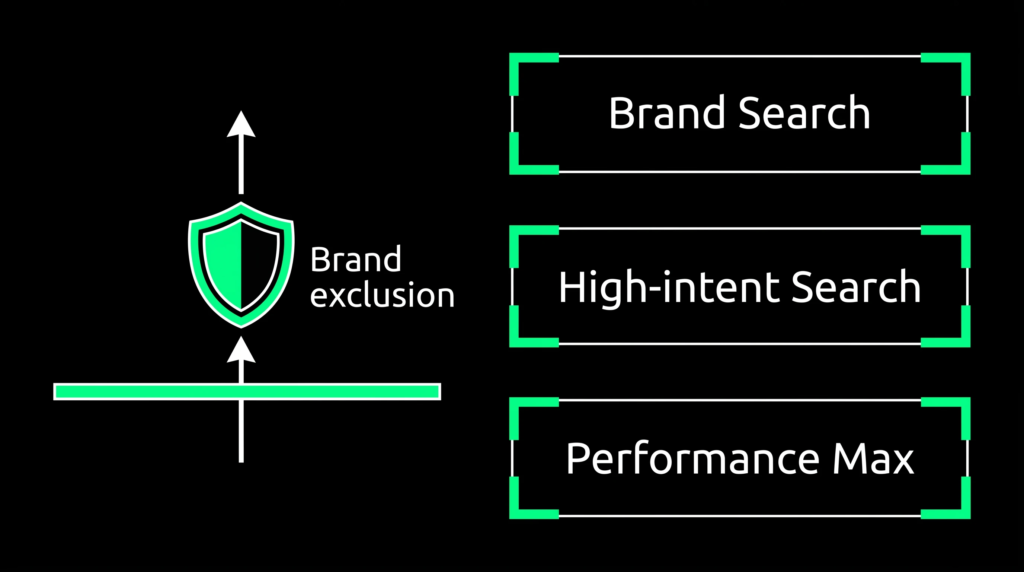
ASK BOSCO recommends a three-layer structure. The first layer is a dedicated brand campaign on exact match. The second covers high-value non-brand terms where you want precise control over the ad and landing page. The third is PMax, handling broader discovery across channels.
Apply brand exclusions in PMax so branded queries flow back to your brand campaign. For Performance Max, brand exclusions cover Search, Shopping, and YouTube search inventory, and Google gives you the option to keep Shopping ads running on searches for excluded brands. Decide that setting on purpose. If you are still debating whether paid brand clicks are worth buying at all, read our take on whether brand campaigns are worth running.
Optmyzr adds a few fixes based on its overlap data:
- Add converting PMax search terms to Search as exact match keywords to shift priority back to Search.
- Add branded misspellings as exact match keywords, since PMax can still pick up fuzzy brand matches.
- Keep Search campaigns from becoming budget-limited, since that is when PMax can step onto exact match terms.
- Use your PMax negative keyword allowance for competitor terms and irrelevant queries.
Branded clicks also overlap with your organic listings, which is why paid brand coverage works best when it is planned alongside your organic search strategy.
When Should You Shift Budget Between PMax and Search?
Shift toward PMax when Search hits impression share ceilings on proven terms and PMax brings in new customers. Shift back toward Search when branded impression share slips or PMax keeps leaning on branded queries after exclusions are in place.
Signals to move budget toward PMax
- Search campaigns hit impression share ceilings on proven terms and cannot spend more without bidding on weaker queries.
- PMax brings in new-customer conversions and non-brand queries you were not capturing before.
- Your product feed and creative assets are strong enough to perform on Shopping, YouTube, and Display.
Signals to pull budget back to Search
- Branded impression share drops after PMax launches or scales.
- PMax search terms skew toward branded or existing-customer queries.
- PMax reports more conversions, but total account conversions stay flat.
Move in small steps. Bigeye recommends budget changes of 15 to 20% at a time after two stable weeks, since bigger jumps can disrupt learning. NAV43 suggests giving PMax 60 to 90 days of consistent budget before judging it. To check whether PMax is finding new buyers rather than recapturing old ones, Google’s customer acquisition goal lets you bid only for new customers or bid higher for them than for existing ones, across Search, Shopping, Performance Max, and Demand Gen campaigns.
How Does AI Max Change the PMax vs Search Decision?
Google’s AI Max for Search campaigns adds broader search term matching, text customization, and final URL expansion to standard Search campaigns. Google reports that advertisers who activate it typically see 14% more conversions or conversion value at a similar CPA or ROAS, based on its internal 2025 data for non-retail advertisers.
For budget planning, this means the control gap between Search and PMax is narrowing. Exact match keywords and regular search term reviews remain the main tools for keeping your highest-value queries in your hands.
The split that works is the one your data supports. Protect Search, prove PMax is finding new demand, and reallocate in small steps every month. If you want a second set of eyes on your account structure, our performance marketing team runs this kind of audit for Google Ads accounts.
Frequently Asked Questions
Should I run PMax and Search at the same time?
Yes, for most accounts. Google positions PMax as a complement to keyword-based Search, and Search keeps priority on exact match queries. Running both lets Search protect brand and high-intent terms while PMax reaches demand your keywords miss.
What percentage of my Google Ads budget should go to PMax?
It depends on spend and business model. Published starting points range from 15 to 25% for accounts spending $10,000 to $50,000 per month, up to 40 to 60% for ecommerce at $50,000 or more. Lead gen accounts often stay closer to 20 to 30%.
How many conversions does PMax need to work well?
A common floor is 30 to 50 conversions per month. Below that, PMax has too little signal to optimize steadily, and Search should carry most of the budget.
How do I know if PMax is cannibalizing my Search campaigns?
Compare branded impression share before and after PMax launched, and pull search terms from both campaign types for the same period. If branded queries appear in PMax and branded impression share drops, PMax is taking those searches.
How often should I rebalance PMax and Search budgets?
Review the split monthly and move budget in 15 to 20% steps. Give each change at least two stable weeks before adjusting again, and judge PMax over 60 to 90 days rather than a single month.