
Instagram now lets every user manually reset the recommendation algorithm that powers Explore, Reels, and the home feed. The feature, which Meta rolled out globally after testing it with teen accounts in late 2024, clears out the signals your account has built up over time: the likes, saves, comments, and lingering views that shaped what showed up on your screen (source: Meta’s official announcement).
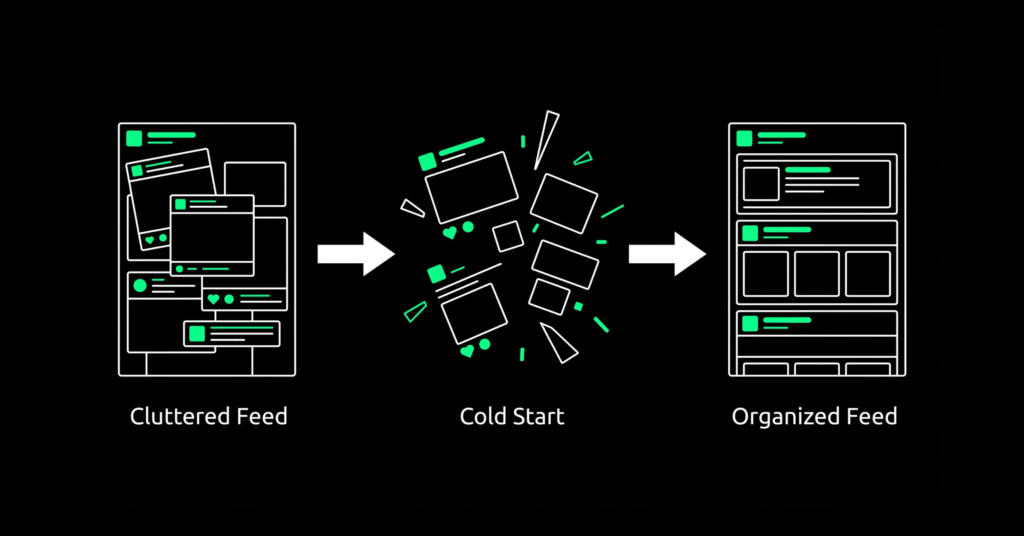
Learning how to reset your Instagram algorithm takes less than a minute inside the app’s Content Preferences menu, and it does not touch your followers, posts, or direct messages. What it does change is what Instagram recommends to you next, sending your account into a fresh “cold start” state similar to a brand-new profile. This guide walks through the exact steps, what to expect in the days after a reset, and how to retrain your feed instead of waiting weeks for it to settle on its own.
What Does Resetting the Instagram Algorithm Actually Do?
Resetting your Instagram algorithm clears the recommendation signals behind Explore, Reels, and your home feed, so Instagram stops using your past likes, saves, and watch time to predict what you want to see. Your followers, posts, and messages stay exactly as they were. For a full breakdown of home feed ranking signals, see Instagram’s Help Center on the home feed.
Instagram builds your feed from a group of smaller ranking systems, one each for the home feed, Stories, Reels, Explore, and Search. Each system weighs its own mix of signals: who you follow and message most, how long you watch a video before scrolling away, which posts you save, and which hashtags or captions match what you search for. Over months of scrolling, these systems build a detailed picture of your habits, and that picture does not always age well. Interests shift, and the algorithm sometimes locks onto a phase you have already moved past. A reset wipes that recommendation profile clean without touching your account history, your relationships on the platform, or the content you have already posted. That same layered ranking logic is worth understanding if you’re building a social presence built for AI discovery rather than just human scrollers.
How Do You Reset Your Instagram Algorithm?
Open your profile, tap the three-line menu, scroll to Content Preferences, then tap Reset Suggested Content. Review your following list if prompted, accept the terms, and confirm. Instagram starts treating your recommendations like a new account right away.
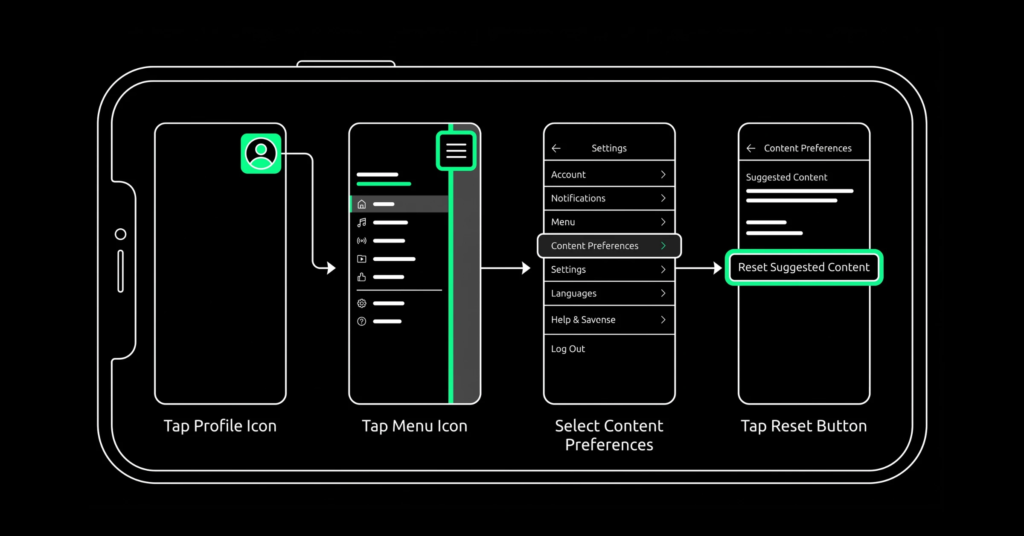
The steps are short, and Meta designed the flow to be walked through in under a minute:
- Go to your profile and tap the three-line menu in the top right corner.
- Scroll to the “What you see” section and tap Content Preferences.
- Tap Reset Suggested Content.
- Review the accounts you follow and your ad topics if you want to unfollow or adjust anything before confirming.
- Accept the terms and tap Reset Suggested Content again to confirm.
Once confirmed, Instagram clears your recommended content across Explore, Reels, and Feed and begins rebuilding your recommendations from scratch based on how you interact with the app going forward. NBC News covered the rollout when Instagram first confirmed users could clear recommendations across Explore, Reels, and Feed in NBC News coverage of the rollout.
What Happens After You Reset Your Instagram Algorithm?
A reset wipes Explore, Reels, and home feed recommendations back to default, but it leaves your followers, posts, Stories, and direct messages completely untouched. Ad topic preferences also refresh, though ads are still targeted using other account data.
| Account Feature | Status After Reset | Notes |
| Explore and Reels recommendations | Wiped, reset to default | Rebuilds as you engage with new content |
| Home feed suggested posts | Wiped, reset to default | Posts from accounts you follow still appear |
| Accounts you follow | Unchanged | You can review and unfollow during the reset flow |
| Posts, Stories, and past activity | Unchanged | Nothing is deleted from your account |
| Direct messages | Unchanged | Not affected by the reset feature |
| Ad topic preferences | Refreshed | Ads still use other targeting data, not just recommendations |
In the first day or two, expect your feed to look a little random. Instagram fills Explore, Reels, and suggested posts with a broad mix of content while it gauges what you respond to, a process often called a cold start. The posts you engage with in this early window carry more weight than usual, since the algorithm is actively testing what to prioritize next. Skimming past something without reacting still counts as a weak signal, so scrolling on autopilot right after a reset can send mixed messages about what you actually want to see.
How Can You Retrain the Algorithm Faster After a Reset?
The fastest way to retrain Instagram’s algorithm after a reset is to interact only with content you actually want more of. Like, save, and comment on relevant posts, skip past anything irrelevant without lingering, and use Not Interested instead of just scrolling by.
Most people wait passively for their feed to settle, which is why it can take one to two weeks to feel fully personalized again. A more deliberate approach speeds that up considerably:
- Engage only with posts that reflect your current interests. Every like, save, or comment is a training signal, so avoid reflexive likes on content you do not actually care about.
- Use Not Interested on anything that shows up but does not fit, rather than simply scrolling past it.
- Follow a handful of accounts squarely in the niche you want more of. New follows carry strong weight in the days right after a reset.
- Clear your search and Explore history separately, since old searches can still influence what surfaces even after a recommendations reset.
- Stay consistent for the first week. The algorithm relearns fastest when your behavior sends a clear, repeated pattern rather than a mixed one.
Should Brands and Creators Reset Their Instagram Algorithm?
For businesses and creators, a reset works better as a diagnostic tool than a permanent fix. It shows what Instagram is organically surfacing in a niche without your personal browsing history skewing the picture, which is useful before planning a content calendar. That kind of consistency is usually easier to maintain with a documented social media marketing service guiding the content calendar.
If you manage a business or creator account, a reset can strip away the noise of your own scrolling habits and show you what Instagram is actually recommending in your niche right now. That is useful research before a content push, but it is not a substitute for a documented strategy. A reset changes what you see; it does not change how the algorithm ranks your own posts for other people’s feeds. Reach and engagement still depend on the same signals they always have: watch time, saves, shares, and how quickly people respond after you publish.
Before treating a reset as a fix for stalled growth, it is worth checking whether your numbers are actually behind where they should be. Comparing your results against current social media engagement rate benchmarks gives a clearer read than a gut feeling, and it often points to a content or targeting issue that no algorithm reset will solve on its own. Brands building out a fuller plan, including SaaS teams shaping a social media strategy around product education rather than personal-style content, tend to get more out of a structured approach than a one-time reset.
Frequently Asked Questions
Will resetting my Instagram algorithm delete my followers or posts?
No. A reset only affects what Instagram recommends to you in Explore, Reels, and your home feed. Your followers, following list, posts, Stories, and direct messages all stay exactly as they were.
How long does it take for the algorithm to adjust after a reset?
Most accounts see a noticeably more relevant feed within a few days, and it typically takes one to two weeks to fully recalibrate. Deliberate, consistent engagement in that window speeds up the process.
Can I reset my Instagram algorithm more than once?
Yes. There is no limit on how many times you can use the feature, though most people only need it occasionally when their feed drifts away from their current interests.
Does resetting affect the ads I see on Instagram?
It refreshes your ad topic preferences, so you may see a wider variety of ads for a short period. Ads are still targeted using other account data, not just your content recommendations. Brands running paid campaigns alongside organic content should track this shift through their performance marketing reporting rather than assuming ad results dipped because of the reset.
Can I undo an Instagram algorithm reset?
No, the reset itself cannot be reversed. You can, however, retrain the algorithm again at any time simply by continuing to interact with the content you actually want to see.