

Fewer than half of mobile websites pass Core Web Vitals. According to the 2025 Web Almanac from HTTP Archive, 48% of mobile sites and 56% of desktop sites meet all three thresholds, based on Chrome UX Report data from July 2025. If your Search Console report is showing red or orange, you are in large company.
Most failures trace back to a short list of causes: a slow server, a hero image the browser finds too late, too much JavaScript on the main thread, and elements that load without space reserved for them. This guide walks through how to fix Core Web Vitals in the order that works best in practice, from diagnosis to verification, with the specific changes that move each metric.
What Does It Take to Pass Core Web Vitals?
To pass, a page needs all three metrics rated “good” at the 75th percentile of real visits: Largest Contentful Paint (LCP) at 2.5 seconds or less, Interaction to Next Paint (INP) at 200 milliseconds or less, and Cumulative Layout Shift (CLS) at 0.1 or less.
Google’s Web Vitals documentation sets the 75th percentile as the bar, segmented by mobile and desktop. In practice, your slowest quarter of visitors, often people on older phones and weaker connections, decides the result. INP replaced First Input Delay (FID) as a Core Web Vital in 2024.
| Metric | What it measures | Good | Needs improvement | Poor | Mobile sites rated good (2025) |
|---|---|---|---|---|---|
| LCP | Load time of the largest visible element | 2.5 s or less | 2.5 s to 4.0 s | Over 4.0 s | 62% |
| INP | Response time to clicks, taps, and key presses | 200 ms or less | 200 ms to 500 ms | Over 500 ms | 77% |
| CLS | Unexpected movement of visible content | 0.1 or less | 0.1 to 0.25 | Over 0.25 | 81% |
Thresholds: web.dev. Pass rates: 2025 Web Almanac, HTTP Archive (July 2025 CrUX data).
LCP is the metric holding most sites back. Only 62% of mobile sites have a good LCP, compared with 77% for INP and 81% for CLS, which is what pulls the overall mobile pass rate down to 48%.
Step 1: How Do You Find Which Metric Is Failing?
Start with field data, not a lab score. Open the Core Web Vitals report in Google Search Console to see which metric fails and on which groups of URLs, then run one URL from each failing template through PageSpeed Insights.
The Search Console report sits under Experience. It groups URLs as Good, Needs Improvement, or Poor and names the metric that is failing. It uses real Chrome user data over a 28-day rolling window, and because it groups similar URLs, one fix to a shared template often clears hundreds of pages at once.
Next, test one URL per page type in PageSpeed Insights: the homepage, a blog post, a product or service page, and a category page. Read the top section, labeled “Discover what your real users are experiencing,” before the lab diagnostics below it. When a URL has too little traffic for its own data, PageSpeed Insights shows origin-level data instead, so check which one you are looking at.
Keep the lab and field split in mind. Lighthouse runs one simulated load and cannot measure INP at all, because no user is clicking anything. It reports Total Blocking Time (TBT) as a stand-in. A green Lighthouse score does not mean you pass. Give the homepage extra attention, too: the Web Almanac found home pages pass Core Web Vitals at 45% on mobile, against 56% for secondary pages.
Step 2: Which Metric Should You Fix First?
If more than one metric fails, work in this order: server response time, then LCP, then INP, then CLS. A slow server adds delay to every loading metric, so frontend work done before fixing it often gets cancelled out.
Time to First Byte (TTFB) is not a Core Web Vital, but it is the first slice of LCP. Performance consultant Arjen Karel points out that an 800 millisecond TTFB has already used a third of the 2.5 second LCP budget before the browser renders anything. In his client data, sites that jumped straight to JavaScript work without fixing TTFB took two to three times longer to pass.
There is one practical exception. Some CLS and INP fixes, like adding image dimensions or deferring a chat widget, can ship the same day, while reworking image delivery for LCP may take a full sprint. If your team needs an early win, take those first, then budget real time for LCP.
Step 3: How Do You Fix Slow Server Response Time?
The “good” threshold for TTFB is 800 milliseconds, and only 44% of mobile sites reached it in 2025. Aim well below that, since every millisecond saved here passes straight through to LCP. The usual fixes:
- Turn on full-page caching so the server does not rebuild the HTML on every request.
- Put a CDN in front of the site so pages are served from locations close to each visitor.
- Remove redirect chains. Google’s guidance names redirects from ads and shortened links as a common cause of slow TTFB.
- Check that unique URL parameters, such as campaign tags, are not forcing requests past the CDN cache and back to the origin server.
- Profile slow database queries and heavy plugins, or move to hosting with server-level caching.
Step 4: How Do You Fix Largest Contentful Paint?
Find the LCP element in PageSpeed Insights, usually a hero image or headline. Make sure the browser can discover it in the HTML, load it at high priority, never lazy-load it, and keep render-blocking CSS and JavaScript from holding it back.
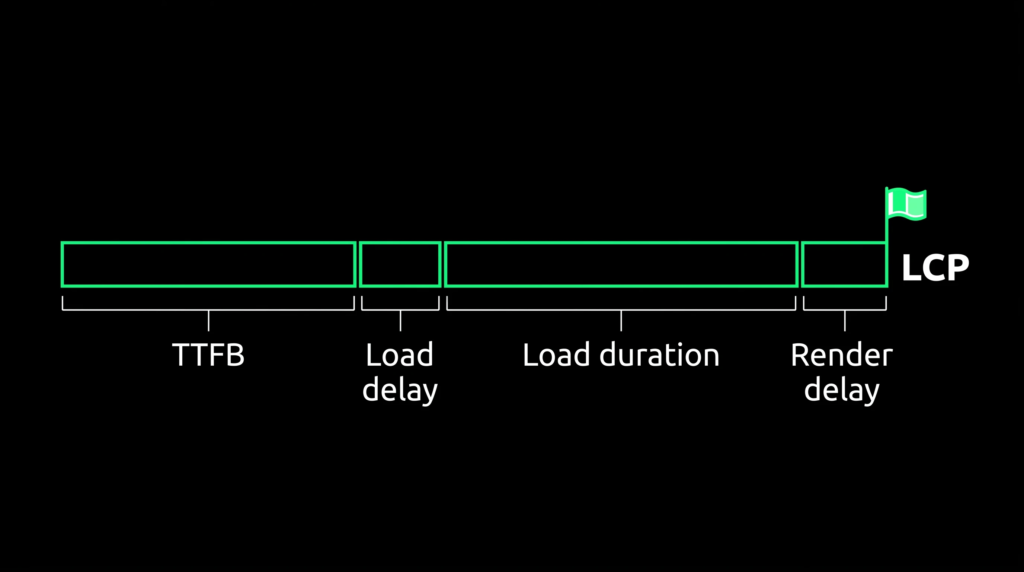
Google’s LCP guide splits the metric into four sub-parts: TTFB, resource load delay, resource load duration, and element render delay. On a well-optimized page, TTFB and load duration each take roughly 40% of the total, and the two “delay” sub-parts take under 10% each. Oversized delays are where the fast gains are.
If the LCP Element Is an Image
- Put the image URL in a normal img tag with a src attribute. If it hides behind data-src or gets injected by JavaScript, the browser cannot find it early.
- Add fetchpriority=”high” to that image. In a Google test on Google Flights, this single change took LCP from 2.6 seconds to 1.9 seconds.
- Remove loading=”lazy” from it. About 16% to 17% of pages still lazy-load their LCP image.
- Serve WebP or AVIF at the right size with srcset. JPG and PNG still make up 57% and 26% of LCP images.
- If the image is a CSS background, preload it in the head with a link rel=”preload” tag that also carries fetchpriority=”high”.
If the LCP Element Is Text
Text LCP usually waits on render-blocking resources. Inline a small amount of critical CSS, defer JavaScript that is not needed to render the page, and self-host and preload the main web font.
One caution from Google’s guide: compressing an image alone may not improve LCP if the element is still waiting on JavaScript to reveal it. The saved time simply moves into render delay, so check all four sub-parts after each change.
Step 5: How Do You Fix Interaction to Next Paint?
INP fails when JavaScript keeps the main thread busy while a user clicks, taps, or types. Fix it by delaying third-party scripts, deferring non-critical code, breaking long tasks into smaller pieces, and keeping event handlers light.
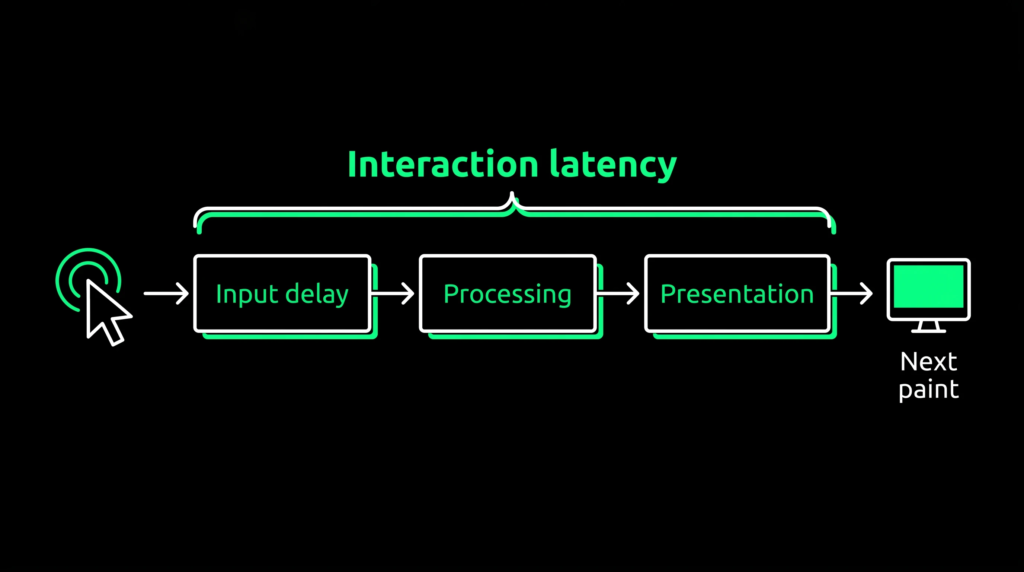
According to Google’s INP guide, every interaction has three phases: input delay (waiting for the main thread to free up), processing duration (your event handlers running), and presentation delay (the browser painting the next frame). To find the slow part, record yourself using the page in the Chrome DevTools Performance panel and look for long tasks, meaning anything over 50 milliseconds.
- Delay third-party scripts. Chat widgets, analytics, A/B testing tools, and ad tags compete for the main thread. Load them after the first interaction, and remove the ones nobody uses.
- Defer first-party JavaScript that the first interaction does not need, and use the Coverage tab in DevTools to find code that loads but never runs.
- Break up long tasks. Yield to the main thread between chunks of work with scheduler.yield() where supported, or a setTimeout fallback, so the browser can respond to input in between.
- Do only the visual update inside an event handler and push the rest, such as saving data or firing analytics calls, to a later task.
- Keep the DOM lean. Large DOMs make every rendering update more expensive.
The lab data shows why this deserves attention. The Web Almanac reports that median mobile TBT rose to 1,916 milliseconds in 2025, up 58% from 2024, even as field INP improved.
Step 6: How Do You Fix Cumulative Layout Shift?
Most layout shift comes from images without dimensions, ads and embeds without reserved space, content injected above what the user is reading, and web fonts that swap late. Reserving space before content arrives fixes the majority of CLS problems.
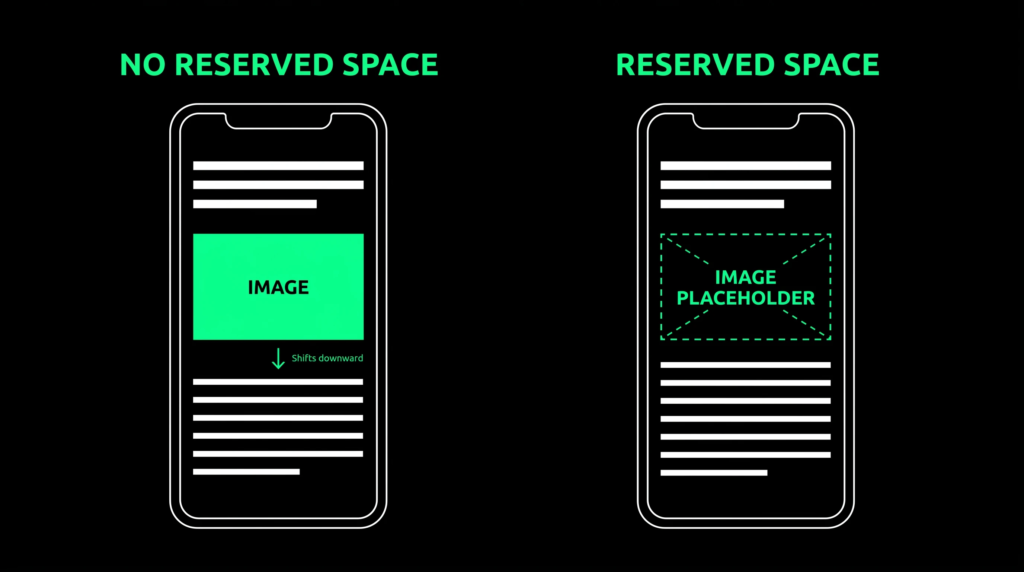
Google’s CLS guide lists the same culprits, and the fixes are mostly HTML and CSS changes:
- Set width and height attributes on every image and video, or use CSS aspect-ratio. In 2025, 62% of mobile pages still had at least one image without dimensions.
- Reserve space for ads, embeds, and banners with min-height or aspect-ratio on the container, and do not collapse the slot if no ad loads.
- Show cookie notices and promo bars as overlays instead of pushing page content down.
- Preload key fonts, use font-display: optional, and match fallback font metrics with size-adjust to reduce reflow.
- Animate with transform and opacity instead of top, left, or other layout properties. Non-composited animations still appear on 40% of mobile pages.
- Keep pages eligible for the back/forward cache so return visits restore instantly without shifts. Avoid unload handlers, which block it.
Step 7: How Do You Confirm the Fixes Worked?
Check field data, not just Lighthouse. Search Console and CrUX use a 28-day rolling window, so expect two to four weeks before improvements fully appear. A real user monitoring tool shows the effect within hours.
Google recommends that sites run their own real user monitoring, since CrUX lacks per-visit detail. Its open-source web-vitals JavaScript library measures all three metrics the same way Google’s tools do and can send them to your analytics platform.
After that, treat performance as maintenance. New plugins, theme updates, and marketing tags cause most regressions. Re-test in PageSpeed Insights after every significant release, review the Search Console report regularly, and audit third-party scripts each quarter. Those checks belong on any technical SEO checklist your team runs. If nobody on the team has developer time to spare, a technical SEO audit can map each failing template to a specific fix.
Core Web Vitals Fixes at a Glance
| Symptom | Likely cause | Fix | Metric |
|---|---|---|---|
| Slow first byte | No page cache or CDN, redirect chains | Full-page caching, CDN, remove redirects | LCP (via TTFB) |
| Hero image appears late | LCP image lazy-loaded or hidden from the HTML | Plain img tag, fetchpriority=”high”, no lazy loading | LCP |
| Clicks feel sluggish | Long JavaScript tasks, third-party tags | Delay third-party scripts, yield inside long tasks | INP |
| Content jumps during load | Unsized images, ad slots, injected banners | Width and height attributes, reserved containers, overlays | CLS |
| Text reflows after load | Late web font swap | Preload fonts, font-display: optional, size-adjust | CLS |
Frequently Asked Questions
How long does it take to see Core Web Vitals improvements?
Search Console and CrUX use a 28-day rolling window, so expect two to four weeks after deployment before the change fully shows. Scores improve gradually as older poor visits age out of the data. A real user monitoring tool shows the effect within hours.
Why is Lighthouse green when Search Console says I am failing?
Lighthouse runs one simulated load under controlled conditions. Search Console reflects real Chrome users on slower phones and weaker networks, including interactions and layout shifts that happen after the page loads. Google uses the field data, so fix what Search Console reports.
Do Core Web Vitals affect Google rankings?
Yes, as part of Google’s page experience signals, but they act more like a tiebreaker between pages of similar quality. Passing will not make up for thin content or a weak backlink profile, and relevance and content quality still carry more weight.
Do I need to pass Core Web Vitals on every page?
Google evaluates pages at the URL level and falls back to URL groups or the whole origin when a page lacks data. Start with your highest-traffic templates, such as the homepage, product pages, and key landing pages. Fixing a shared template usually fixes every page built on it.
What replaced First Input Delay?
INP replaced FID as a Core Web Vital on March 12, 2024. FID only measured the wait before the browser started handling the first interaction. INP measures the full time until the next frame paints, across the interactions on a page.